https://docs.github.com/en/actions
한줄 소개
빌드, 테스트, 배포 파이프라인을 자동화하는 CI/CD 플랫폼
Action이라는 단위의 작업을 생성하고 공유할 수 있고, 공유된 액션을 검색해 사용할 수 있다
일단 시작해보기
https://docs.github.com/en/actions/quickstart
Github Actions 활성화하기
기본적으로 활성화되어 저장소 화면에 Actions 탭으로 보여지는데, 안 보인다면 아래 글 참고하자
workflow 만들기
깃헙 저장소에 푸쉬할 때마다 테스트를 수행하게 하거나 병합된 PR을 운영환경에 배포하기 위해 workflow를 만들 수 있다
로컬 저장소의 루트에 .github/workflows 폴더를 만든다
워크 플로우는 YAML 파일로 설정한다
위 폴더 안에 아래와 같은 github-actions-demo.yml 파일을 만든다
name: GitHub Actions Demo

run-name: ${{ github.actor }} is testing out GitHub Actions 🚀

on: [push]

jobs:
  Explore-GitHub-Actions:
    runs-on: ubuntu-latest
    steps:
      - run: echo "🎉 The job was automatically triggered by a ${{ github.event_name }} event."
      - run: echo "🐧 This job is now running on a ${{ runner.os }} server hosted by GitHub!"
      - run: echo "🔎 The name of your branch is ${{ github.ref }} and your repository is ${{ github.repository }}."
      - name: Check out repository code
        uses: actions/checkout@v4
      - run: echo "💡 The ${{ github.repository }} repository has been cloned to the runner."
      - run: echo "🖥️ The workflow is now ready to test your code on the runner."
      - name: List files in the repository
        run: |
          ls ${{ github.workspace }}
      - run: echo "🍏 This job's status is ${{ job.status }}."
브랜치를 원격 저장소로 푸쉬한다
깃헙의 Actions 탭을 클릭한다
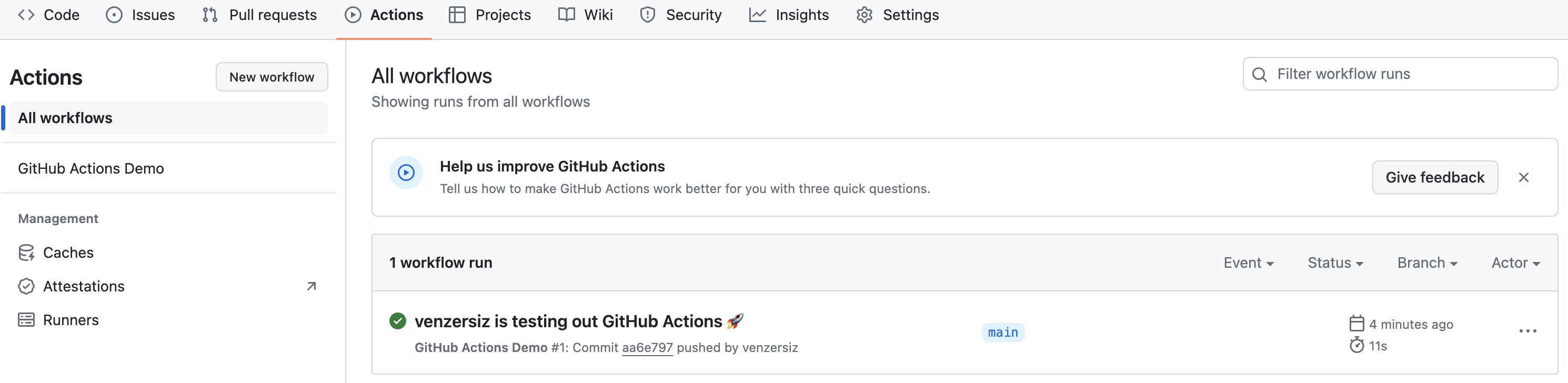
위와 같이 하나의 workflow run이 만들어진 것을 볼 수 있다
name 속성
해당 값으로 액션명이 생성된다
run-name 속성
workflow run의 이름이다
${{ }} 문법을 사용해 Contexts를 사용할 수 있다
https://docs.github.com/en/actions/learn-github-actions/contexts
여기서는 깃헙 사용자명으로 치환되었다
on 속성
이벤트를 말하는 것으로 보인다
여기서는 push 이벤트에 반응한다
(대괄호로 감싼 이유는 YAML 문법에서 List를 한 줄에 표현하는 방법이기 때문이다)
jobs 속성
jobs 하위에 작성한 항목의 이름으로 Job을 작성한다. 뒤에서 알아보겠다
runs-on 속성
우분투 OS의 최신 버전으로 잡을 실행하라는 의미로 보인다 (Docker 같은 컨테이너에서 실행될 것으로 추측된다)
위 글을 읽어보니 깃헙에서 직접 Hosting(관리)하는 Runner들 중 우분투 OS를 사용하는 것 같다
러너는 말그대로 실행하는 주체(OS)를 말한다
steps 속성
수행할 잡을 절차대로 작성한다
Status 열을 보면 수행시간이 11s인 것을 확인할 수 있다
이제 run-name에 해당하는 링크를 클릭하자
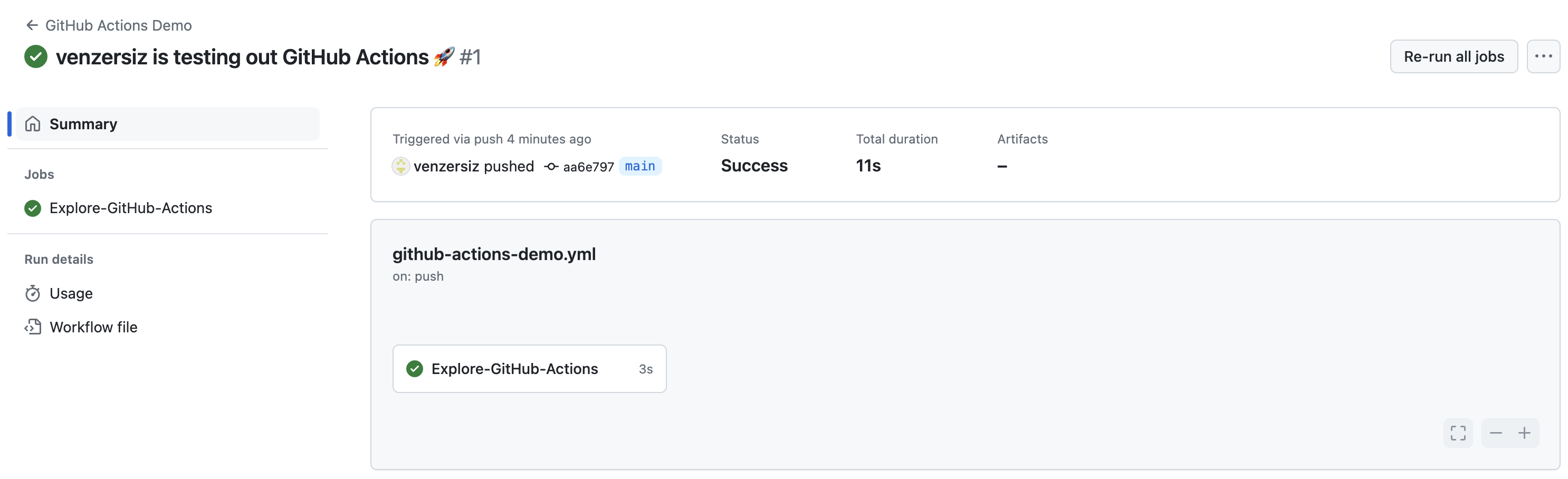
위와 같은 화면으로 이동하게 된다
상태는 Sucess로 나오는 것으로 보아 Job이 자동으로 실행된 것으로 보인다
가운데에 Explore-GitHub-Actions 버튼을 눌러보자
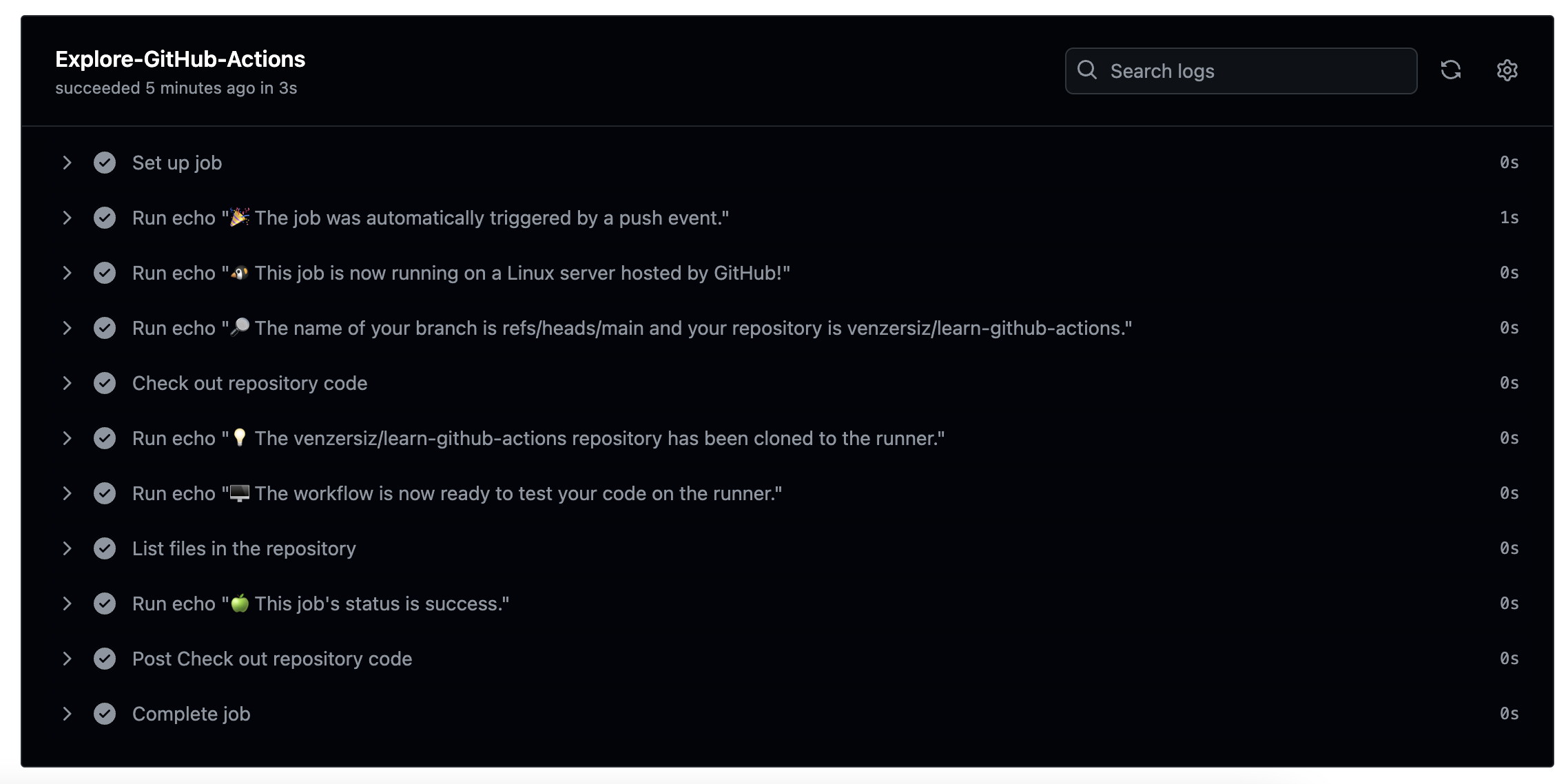
잡 실행 로그를 확인할 수 있다
위 내용을 통해 아래 내용을 확인할 수 있다
- run 명령으로 리눅스의 명령을 수행할 수 있다
- 깃 이벤트에 대응
- 깃헙에 의해 호스팅되는 컨테이너?에서 실행
- uses 속성을 통해 깃헙에서 기정의한 액션을 실행할 수 있다
- 여기서는 Git checkout을 통해 저장소를 클론했다
실용 예제 1. dev, stage 서버 환경의 애플리케이션이 있을 때
dev, stage 서버 환경에서 애플리케이션을 제공하고 각 환경에 대응하는 dev, stage 브랜치로 배포한다고 가정하자
feature 브랜치 개발이 완료되어 dev, stage 서버에 배포를 하고자 하면 아래와 같이 유사한 작업을 2번씩 매번 해줘야하는 불편함이 있다
- feature 브랜치를 dev 브랜치에 병합하고 dev 서버에 배포
- feature 브랜치를 stage 브랜치에 병합하고 stage 서버에 배포
특정 브랜치에 대한 푸쉬 이벤트라는 것을 어떻게 알 수 있을까?
on.push.branches 속성을 사용하면 된다
여기서는 deploy/dev-and-stage라는 브랜치로 푸쉬했을 때 이벤트 발생하도록 하겠다
스프링 부트에서 허용하는 프라퍼티 파일에서와 같이 계층없이 한줄에 적는 아래와 같은 방식은 지원하지 않는 것 같다
on.push.branches: [deploy/dev-and-stage]
on:
  push:
    branches: [deploy/dev-and-stage]
만약 feature/로 시작하는 기능 브랜치를 푸쉬했을 때 이벤트가 발생하기 원한다면 아래와 같이 할 수도 있다
on:
  push:
    branches: [feature/*]
이제 해당 이벤트 발생 시 애플리케이션 빌드를 해야하는데 여기서는 Jenkins를 사용한다고 가정해보자
Jenkins의 Remote Access API를 사용하면 웹 API 호출 방식으로 빌드 작업을 유발할 수 있다
방법은 나중에 작성하겠다
실용 예제 2. GitHub Enterprise를 사용하고 있어 GitHub-hosted runner를 사용할 수 없다면?
회사에서 깃헙 엔터프라이즈를 사용하는 예이다
직접 Runner 컴퓨터를 준비해보자
아래와 같이 관리 계층의 다양한 수준에 추가할 수 있다
- 저장소 수준
- 하나의 저장소 전용
- 조직 수준
- 한 조직에 속한 여러 저장소 전용
- 기업 수준
- 기업 계정의 여러 조직에 할당될 수 있다
여기서는 저장소 수준의 Runner를 준비해보겠다
Self-hosted runner 추가하기
지원하는 OS는 여기서 확인할 수 있다
보안상의 이유로 private 저장소에만 작업하도록 안내하고 있다. 회사에서는 보통 private 저장소로 만들고 관련 있는 개발자만 접근 권한을 주고 있기 때문에 문제가 없을 것이다
저장소에 자체 호스팅형 실행기 애플리케이션 추가하기
우선 저장소의 소유자여야 한다
해당 저장소의 Settings 탭으로 이동 > 왼쪽 메뉴의 Actions > Runners > New self-hosted runner 버튼 클릭
여기서는 Mac에 설치한다고 가정한다
- Runner image: macOS
- Architecture: x64
다운로드 후 압축해제
mkdir actions-runner && cd $_

curl -o actions-runner-osx-x64-2.317.0.tar.gz -L https://github.com/actions/runner/releases/download/v2.317.0/actions-runner-osx-x64-2.317.0.tar.gz

tar xzf ./actions-runner-osx-x64-2.317.0.tar.gz

rm actions-runner-osx-x64-2.317.0.tar.gz
tree -L 1
.
├── bin
├── config.sh
├── env.sh
├── externals
├── run-helper.cmd.template
├── run-helper.sh.template
├── run.sh
└── safe_sleep.sh

3 directories, 6 files
자체 호스팅형 실행기 애플리케이션 설정 및 깃헙 액션에 등록하기
깃헙 사이트 본문에 자동 생성된 토큰을 사용하는 명령이 있으니 그대로 복붙해서 실행하자
./config.sh --url 저장소URL --token 토큰
--------------------------------------------------------------------------------
|        ____ _ _   _   _       _          _        _   _                      |
|       / ___(_) |_| | | |_   _| |__      / \   ___| |_(_) ___  _ __  ___      |
|      | |  _| | __| |_| | | | | '_ \    / _ \ / __| __| |/ _ \| '_ \/ __|     |
|      | |_| | | |_|  _  | |_| | |_) |  / ___ \ (__| |_| | (_) | | | \__ \     |
|       \____|_|\__|_| |_|\__,_|_.__/  /_/   \_\___|\__|_|\___/|_| |_|___/     |
|                                                                              |
|                       Self-hosted runner registration                        |
|                                                                              |
--------------------------------------------------------------------------------

# Authentication


√ Connected to GitHub

# Runner Registration

Enter the name of the runner group to add this runner to: [press Enter for Default]

Enter the name of runner: [press Enter for krevis-m1]

This runner will have the following labels: 'self-hosted', 'macOS', 'X64'
Enter any additional labels (ex. label-1,label-2): [press Enter to skip]

√ Runner successfully added
√ Runner connection is good

# Runner settings

Enter name of work folder: [press Enter for _work]

√ Settings Saved.
깃헙의 Actions > Runners > Self-hosted runners로 이동하면
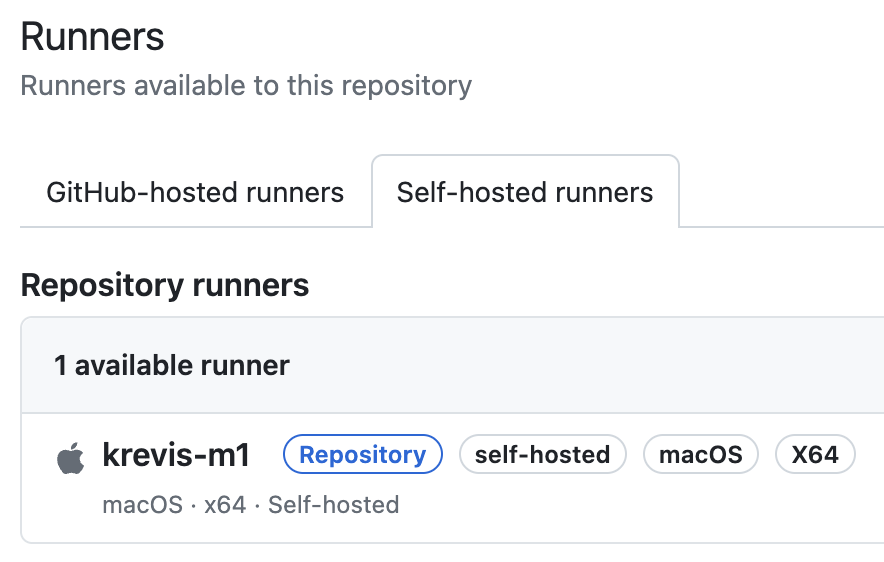
위와 같이 실행기가 생성된 것을 확인할 수 있다
코드 푸쉬
runs-on 속성에 self-hosted를 설정한다
..
jobs:
  deploy:
    runs-on: self-hosted
..
runs-on은 여러 타입의 값을 허용한다. 단일 문자열 또는 배열 등이 가능하다. 여기서는 단일 문자열로 설정했다
name: dev-and-stage 브랜치 푸쉬 시 dev, stage 서버에 자동 배포

run-name: dev-and-stage 브랜치 푸쉬 시 dev, stage 서버에 자동 배포

on:
  push:
    branches: ['deploy/dev-and-stage']

jobs:
  deploy:
    runs-on: self-hosted
    steps:
      - run: echo "🎉 The job was automatically triggered by a ${{ github.event_name }} event."
      - run: echo "🐧 This job is now running on a ${{ runner.os }} server!"
      - run: echo "🔎 The name of your branch is ${{ github.ref }} and your repository is ${{ github.repository }}."
      - name: Check out repository code
        uses: actions/checkout@v4
      - run: echo "💡 The ${{ github.repository }} repository has been cloned to the runner."
      - run: echo "🖥️ The workflow is now ready to test your code on the runner."
      - name: List files in the repository
        run: |
          ls ${{ github.workspace }}
      - run: echo "🍏 This job's status is ${{ job.status }}."
푸쉬를 하고 깃헙에서 상태를 보니 Queued 상태에서 뭔가 진행되지 않았다

이유는 자체 호스팅형 실행기 애플리케이션을 설정만 했지 실행을 안 해서이다
./run.sh
√ Connected to GitHub

Current runner version: '2.317.0'
2024-06-29 01:54:28Z: Listening for Jobs
2024-06-29 01:54:33Z: Running job: deploy
2024-06-29 01:54:57Z: Job deploy completed with result: Succeeded
로그를 보고 유추해보았을 때 자체 호스팅형 실행기 애플리케이션이 이벤트를 대기하고 있다가 잡을 실행하고 나서 다시 이벤트를 대기하는 형태로 동작하는 것 같다
깃헙에서 상태를 다시 보자
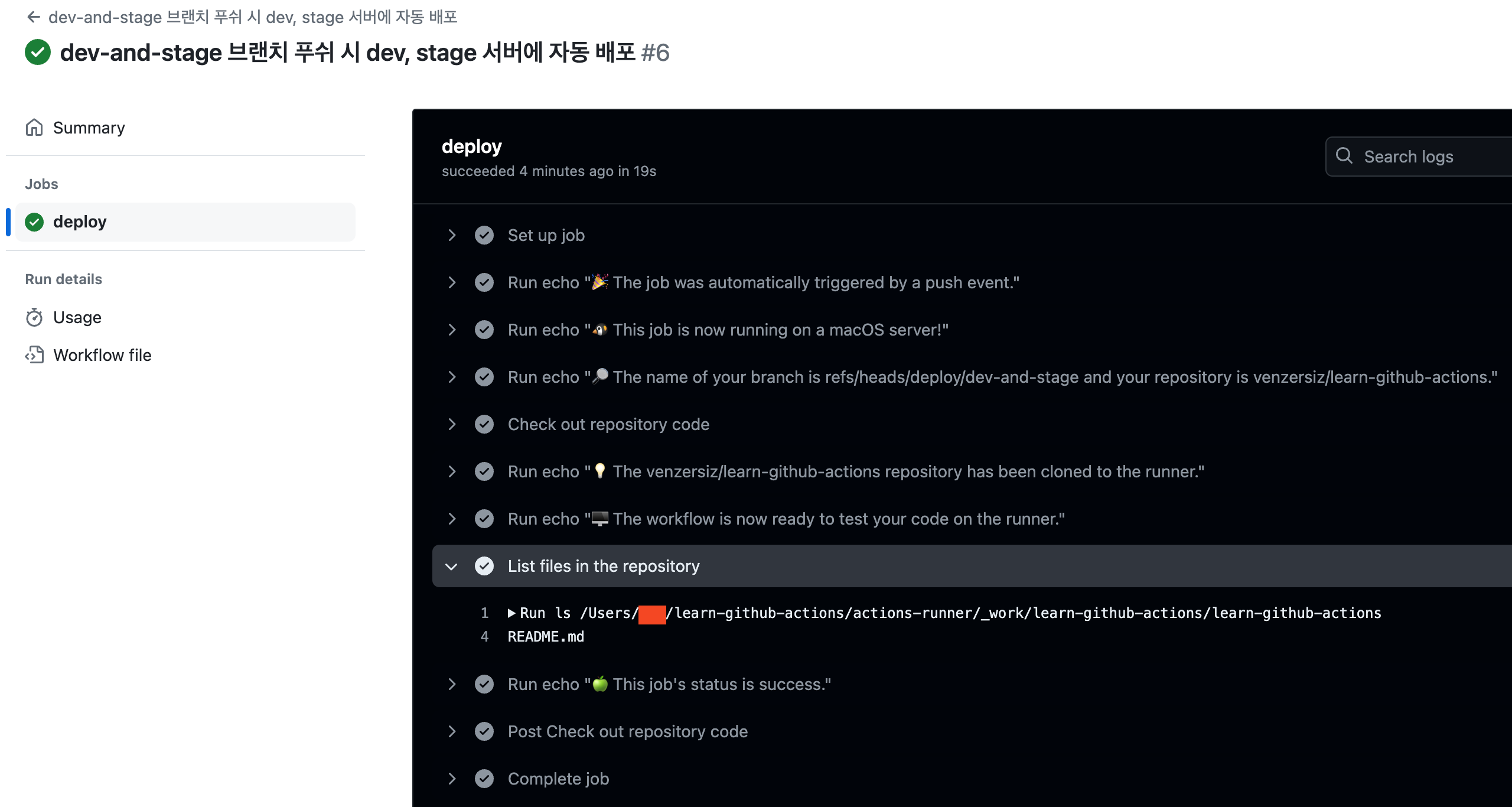
정상적으로 처리된 것을 확인할 수 있다. 테스트 삼아 푸쉬할 때 README.md도 같이 푸쉬를 하였고 ls로 잘 출력되는 것을 확인할 수 있다